@adlrocha - Taming the Agents: My "Spec-Test-Lint" Workflow for AI Coding

@adlrocha Beyond The Code
@adlrocha - Taming the Agents: My "Spec-Test-Lint" Workflow for AI Coding
Why I Moved to a CLI-First AI Setup (and How It Works)
Why I Moved to a CLI-First AI Setup (and How It Works)
The plan for this week was to share part 2 of last week’s post on the existential crisis facing open source. Unfortunately, a series of personal events are not going to let me spend the time that this post deserves.
But now that I’ve built my writing habit again, I couldn’t leave you (and myself) without a weekly post. This is why this post will be a bit lighter, and focused on my AI-powered coding workflow.
Background
Even if you are not actively writing code on a daily basis, or part of the software industry, it is common knowledge that coding agents and LLMs are becoming more and more capable.
From becoming software engineers’ best friends, to solving in just one week 4 Erdos Problems and coming up with a novel algorithm for matrix multiplication, and letting individuals without any engineering background to vibe code one game a day.
They may still have their limitations, but what is clear by now is that we need to learn how to leverage them to accelerate our productivity. I don’t know about you all, but I’ve been trying to find the best way to embed them in my daily flow since the release of ChatGPT and the first release of Github Copilot. But software engineering has changed forever, and AIs are no longer optional “nice-to-haves”.
As expected, my setup has evolved a lot since, but I feel like I am at a point where I’ve been using my current setup consistently for some time in different types of projects and with different code base complexities, and I am comfortable sharing it more broadly.
The goal for this post is two-fold: (i) to help others that may be navigating this highly-changing space like I’ve been doing the past few months; (ii) and to get feedback and ideas of things that I should improve that I am not aware of.
This setup is the result of a lot of trial-and-error from my side, and a lot of interesting conversations with colleagues and technical friends. Let’s jump right into it.
A CLI-first setup
A bit of housekeeping first. Before we begin you should know that:
I run a Linux machine. If you are running on Windows this setup may not be 1:1 applicable to you but it may give you some inspiration. Mac users may have a better time replicating it.
Throughout my life (and my career) I’ve tried a lot of IDEs. Nvim has always been my go-to IDE, but I’ve also been a happy VSCode user (especially when this was the only way to get decent support for Github Copilot), and a Spacemacs lover (until I discover LazyVim, and setting up a proper multi-language IDE that could be easily portable in vim stopped sucking hard).
In terms of coding agents, AI-powered IDEs, and LLMs, I’ve tried pretty much everything under the sun with varying levels of depth and throughout different time windows: from Cursor, Windsurf, Antigravity, opencode, claude code, codex, Github Copilot, etc.
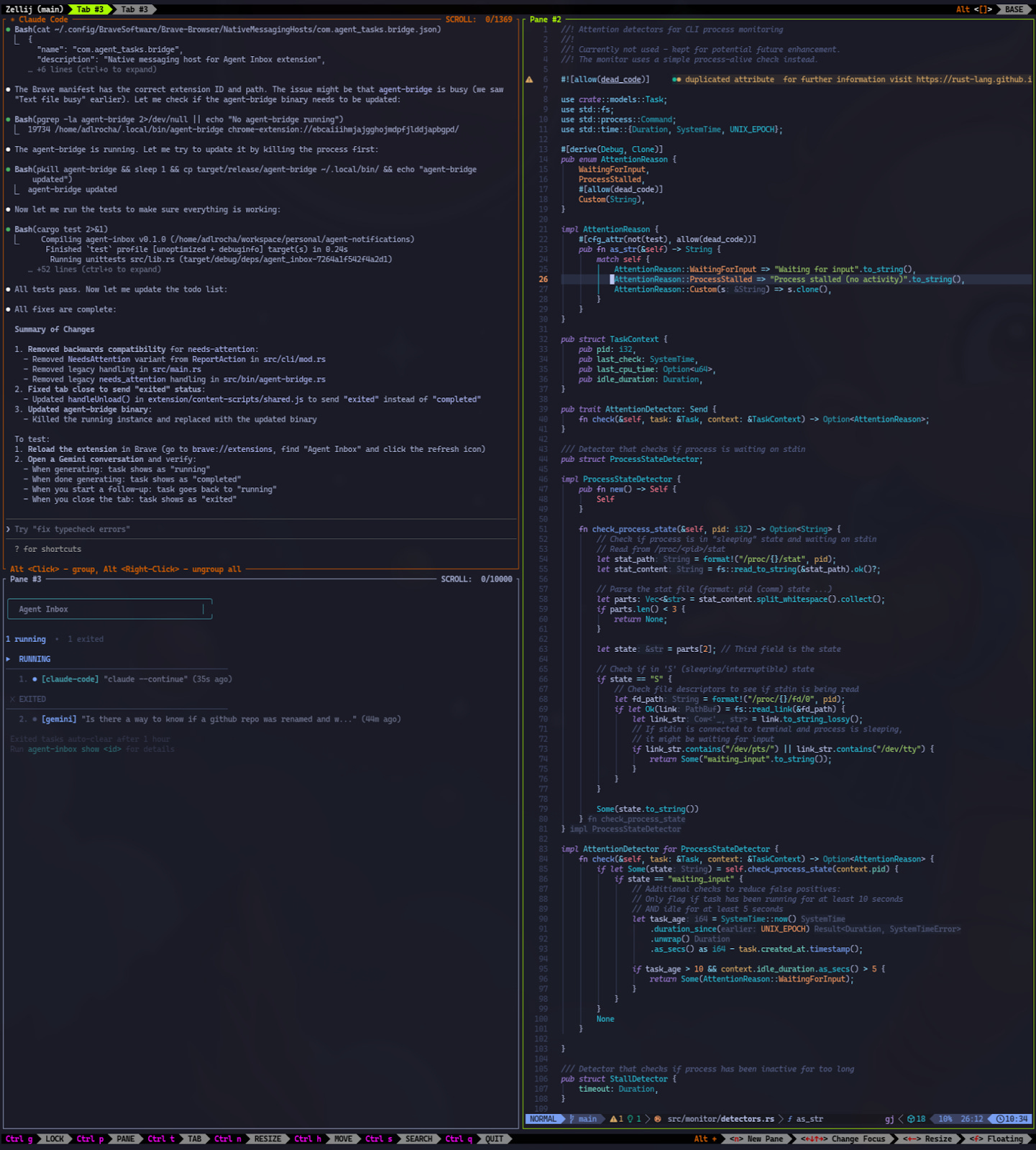
After all of these experiments, the winning setup is a cli-first environment with:
Alacritty as the terminal emulator.
Zellij as my terminal window multiplexer.
One sub-window for the cli coding agent: mainly claude code or opencode (more on this in the next section)
One for my agent inbox
And one for the code.
Here’s a sample screenshot of what I had opened on the time of this writing (completely unfiltered).
My high-level flow: “Spec-Test-Lint”
These days I write code for two different types of projects:
Vibe-coded projects: these are small tools and side-projects that I write to increase my daily productivity and try to push coding agents to their limit. For these projects, I am not as strict with the quality of the code generated as long as the tool works, although I usually check the code to prevent potential hallucinations and blunders.
Professional projects, i.e. Baselight codebase. These are complex code bases with a large number of files and related repos. They require deep knowledge of the architecture, and I am really strict with the quality of the code and tend to review every line generated by the agents.
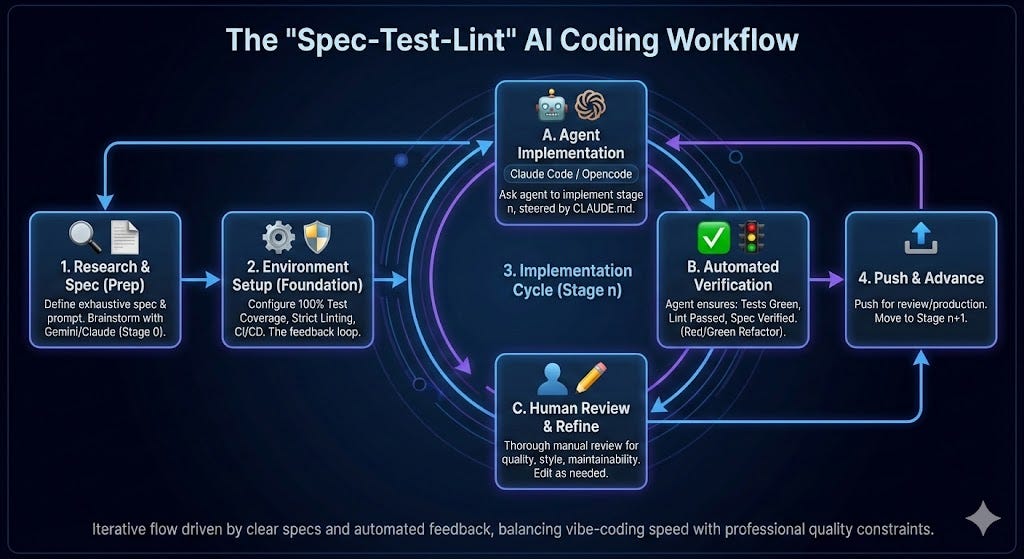
Despite being quite different in nature, I use the same development flow for both of them. The only thing that changes is the effort and care that I put in each of the stages. I call the flow that I use the “Spec-Test-Lint” cycle (I even have a global CLAUDE.md/AGENTS.md file that I use to steer all of my agents in my local environment towards this flow). The flow works as follow:
Every feature and every project starts with a clear spec. My first prompt is always an exhaustive description of what I want and the high-level spec of the feature or project. Of course, this assumes that I already know what I want to do and how I want to implement it. In many cases, before this stage there is a stage 0 where I use Gemini or Claude to brainstorm potential implementations, explore the underlying technologies, and research the state-of-the-art so I can have the right background to steer the implementation.
Before we start any implementation, the project environment is configured in a way where every feature can be tested end-to-end with 100% coverage (including edge cases), and there is exhaustive linting in strict mode, and a working CI/CD environment. Why? Because this is the feedback loop for the agent. The more complete the spec is and the closer the test cases is to the spec, the more autonomously the coding agent will be able to work in the implementation, and the highest the quality of the generated code.,
Once we have the dev environment ready, and I am satisfied with the plan and the spec that we’ve come up with, which generally consists of incremental implementation stages, we can kick off the implementation (if you have used any coding agent you know what I am talking about).
For the implementation I use the following flow for each implementation stage (as you may infer from my CLAUDE.md). I always try each stage to be operational in itself and self-contained so that they can be directly pushed to production (if needed):
I ask the coding agent to implement stage n. I may need to steer it a bit some times but it generally is able to come up with working code.
The agent is instructed to only consider an implementation stage complete if it is exhaustively tested, the linter is green, and it can verify that it works and ascribes with the spec.
With the code for a stage done, I thoroughly review it before pushing it, and in many cases edit things around manually to improve the quality of the code, its maintainability, or because I want it to be closer to my coding standards/style. This is the step where depending on the nature of the project, if it is just a side project or a professional one, I may spend more or less time depend
I then push the code for review (or to production), and move on to the next stage in the implementation.
A feature is not “done” until it is fully tested.
Full Coverage: Every new logical path must be covered by a test.
Red/Green Refactor: Write the test before or alongside the implementation.
Verification: You must run the test suite and verify it passes before confirming task completion
— Excerpt from my global CLAUDE.md
FAQs
There are a few more things that I wanted to share but that I couldn’t fit nicely above, so let me share a few FAQs that may help giving you a bit more of color on my flow:
Do you only use Claude Code or use other coding agents?
I have a premium subscription to Claude, and I use Claude Code as my primary coding agent.
However, if I run out of tokens on a development session, I also have a free premium Github Copilot subscription (for being an active open source maintainer) that I have connected to opencode so when I run out of claude tokens I can continue my work. I also use opencode with open source models that I run locally in Ollama, but I’ll leave that to some other day.
Do you use sandboxed environments? How do you run experiments without polluting your code bases?
I don’t use sandboxed environments. I sometimes have several copies of a repo so that I can run parallel experiments on how to approach different features, and do A/B testing of an implementation without polluting the environments. So far this has shown to be really productive.
Do you use the infamous “yolo mode” on your coding agents?
Precisely because I don’t use sandboxed environments I don’t trust my agents in Yolo mode. I have a list of commands in my .claude/settings.json that are always allowed, but I am still a bit afraid of yolo’ing. My flow is still “human-in-the-loop”-oriented, so I also use these confirmation events to check-in on the agent’s progress.
That being said, I’ve come across projects like https://exe.dev/ and I’ve been tinkering with remote development environments that have made me consider setting up something that allows me to run agents while I sleep. I’ll let you know if I end up going down this route.
Context-switching is a bitch, and coding agents seem to be making it worse. Do you use any tricks to prevent it?
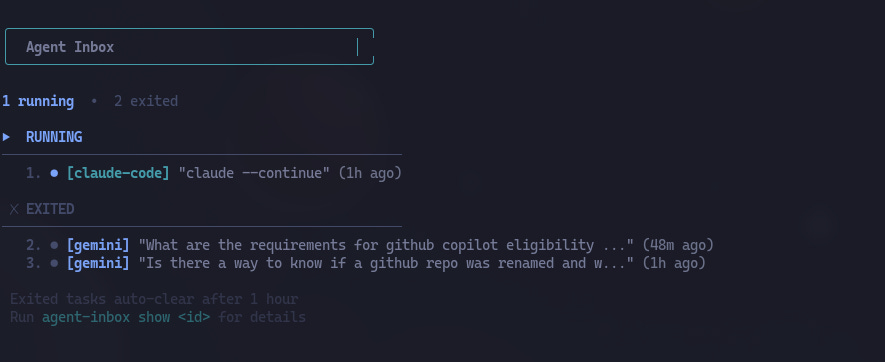
One of the vibe-coded projects from last week has been an agent inbox. This tool tracks the state of the different LLMs or agents that I am running. That way I don’t have to be continuously checking in on my agents. I usually have a primary task and leave others running in the background in the form of agents or deep research. Once I am finished with my main task, or I am at a point where I can afford some distraction, I go to my agent inbox and see if any of my agents need his human companion. So far this has been a huge improvement to the case where I was constantly checking if an agent was done or required my input.
What has affected the quality of the generated plans and code the most?
Prompting. Prompting is a skill, and the more complete and detailed the prompt is, the better the output. I see myself spending more and more time drafting the prompts, especially in the planning stage.
Additionally, I use this trick of tracking in a FUTURE_PROMPTS.md file that I checkout in the repo ideas of prompts that I feel can improve the code in future iterations (as sometimes, a single prompt may not be able to capture everything that you want to communicate to the agent).
Your Turn: How Are You Coding with AI?
As I mentioned at the start, this setup is the result of constant tinkering, and I am under no illusion that it is “finished”.
The landscape of coding agents is moving too fast for anyone to have the perfect answer yet. That is why I am sharing this, I want to know what I’m missing.
Are you fully committed to the CLI, or do you find the integrated UX of tools like Cursor or Windsurf indispensable? How do you handle the “human-in-the-loop” friction? Please drop a comment or reach out to share your own stack and workflow limitations. Let’s figure out the future of software engineering together.

No posts
Ready for more?